Guides · AI agents
Send a request with an AI agent
A request asks one named recipient to complete a form. This guide has an agent send one with the company name filled in and locked, then read the answers once the recipient submits.
Last checked
You need an AI tool with formbase connected and a published form. This guide uses the one built in Build a form with an AI agent. What a request is, and every option it takes, is in Creating requests.
1. Ask for the request
Say which form, who it goes to, what you already know, and how the link reaches them:
Send a formbase request with the "[Guide] Supplier onboarding" form to Ada Lovelace (ada@acme.example). Fill in the company name "Analytical Engines Ltd" and lock it so she cannot change it. Use supplier-2041 as the external ID. Don't email her; give me the link and I will send it myself.The agent finds the form, reads its field keys, and creates the request. It replies with the link for the recipient and when the request expires.
Fill in and lock. A filled-in answer is prefilled; a locked one is shown but cannot be changed.
External ID is your own id for this piece of work, like a supplier or deal number. You can refer to the request by it later, also in a new conversation, instead of by formbase’s request ID.
Email or link. Ask the agent to email the recipient and formbase sends the invitation and reminders; that needs a Pro or Business plan. Otherwise you get the link and send it yourself. If the form has Send reminders on, formbase still emails the recipient its scheduled reminders; to prevent that, also say no reminders.
Try it with a test request first
Say send a test request while you try this out. A test request never emails anyone and counts nowhere, so open the link yourself. The Requests page lists it only with the Show test requests filter on. To look it up by external ID, tell the agent it is a test request. A test request cannot be reminded.
2. The recipient completes the form
The recipient opens the link and finds the company name filled in and locked:
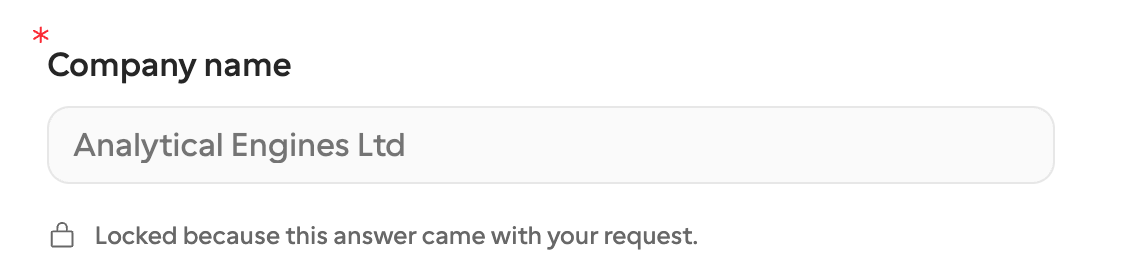
The request shows in formbase under Requests, pending until the recipient submits and completed after:

3. Read the answers
The agent is not told when the recipient submits. Ask it, in the same conversation or a new one:
Has the formbase request supplier-2041 been answered? Show me the answers.The agent looks the request up by its external ID and, once it is completed, lists each answer. A file answer comes with a download link. If the form has a decision question, the reply also says whether the recipient approved, declined or asked for changes.
To act on answers without asking, have a workflow receive a callback when the request finishes, or start one from Zapier.
Remind or cancel
While a request is pending, ask the agent to remind Ada about supplier-2041 to send a reminder email now, or to cancel it. Reminders need the recipient’s email and a Pro or Business plan. A request gets at most eight reminders, scheduled and manual together, and manual ones at least ten minutes apart; see Invitations, reminders & expiry. Canceling is permanent: the link stops working at once, and most AI tools ask you to confirm first.