Guides · REST API
Receive and verify the callback
A request with a callbackUrl ends with a signed POST to that URL: the answers when the recipient submits, or word that it expired or was canceled. This guide runs a receiver on your machine, checks the signature, and prints the answers.
Last checked
You need an API token and a published form, as in Send a request with the REST API, and Node or Python on your machine. What a callback carries, and how retries work, is in Callbacks & signing.
1. Copy the signing secret
formbase signs every callback with your workspace’s request signing secret. Open OAuth and API Keys in the workspace sidebar and find the Request signing secret card:
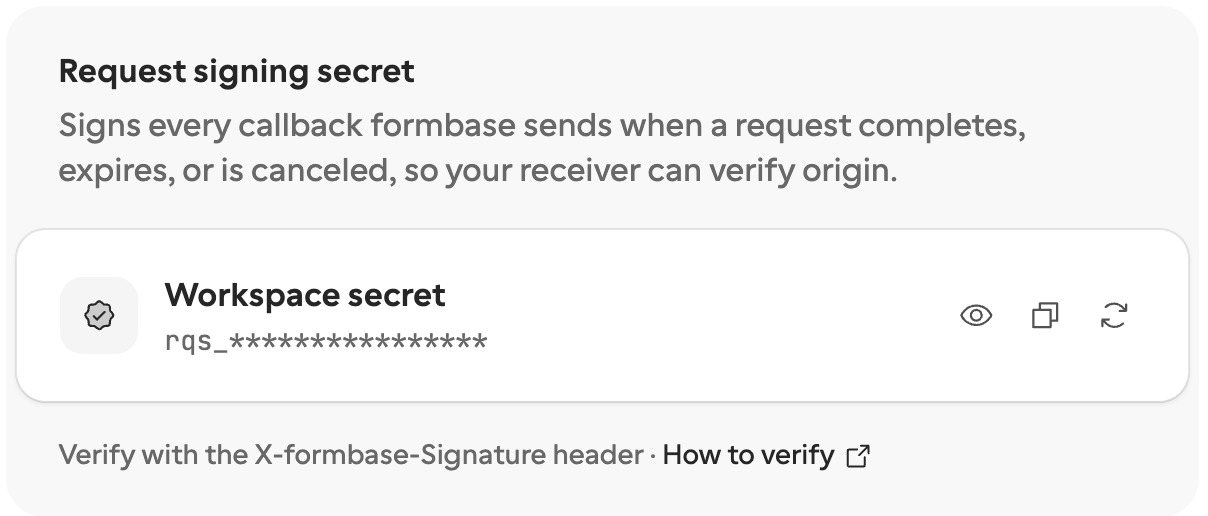
Click the copy button and keep the secret in an environment variable in the terminal where your receiver will run:
export FORMBASE_SIGNING_SECRET='rqs_...'Do not regenerate it
The third button makes a new secret, and the old one stops working at once, also for callbacks already on their way. You do not need it to follow this guide.
2. Write the receiver
Save the verify function from Callbacks & signing next to your receiver: as
verify.mjs for Node, since it uses import, or as verify.py for Python. The receiver reads the raw
body, checks the signature, and only then parses the JSON:
import http from 'node:http'
import { verifyFormbaseCallback } from './verify.mjs'
const secret = process.env.FORMBASE_SIGNING_SECRET
http
  .createServer((req, res) => {
    const chunks = []
    req.on('data', (chunk) => chunks.push(chunk))
    req.on('end', () => {
      const rawBody = Buffer.concat(chunks).toString('utf8')
      const signature = req.headers['x-formbase-signature'] ?? ''
      if (!verifyFormbaseCallback(rawBody, signature, secret)) {
        console.log('rejected: bad signature')
        res.writeHead(401).end()
        return
      }
      const event = JSON.parse(rawBody)
      console.log(event.type, event.data.request.externalId, JSON.stringify(event.data.answers))
      res.writeHead(200).end()
    })
  })
.listen(8787)import json, os
from http.server import BaseHTTPRequestHandler, HTTPServer
from verify import verify_formbase_callback
SECRET = os.environ['FORMBASE_SIGNING_SECRET']
class Handler(BaseHTTPRequestHandler):
def do_POST(self):
raw_body = self.rfile.read(int(self.headers['Content-Length']))
signature = self.headers.get('X-formbase-Signature', '')
if not verify_formbase_callback(raw_body, signature, SECRET):
print('rejected: bad signature', flush=True)
self.send_response(401)
self.end_headers()
return
event = json.loads(raw_body)
print(event['type'], event['data']['request'].get('externalId'), event['data'].get('answers'), flush=True)
self.send_response(200)
self.end_headers()
HTTPServer(('', 8787), Handler).serve_forever()Hash the body exactly as it arrived. Parsing it and turning it back into JSON changes the bytes, and the signature no longer matches.
3. Run it and give it a public URL
Start the receiver:
node receiver.mjs # or: python3 receiver.pyformbase only calls public HTTPS addresses, so localhost will not do. While you test, a tunnel gives your machine one.
Cloudflare’s quick tunnel
needs no account. Run it in a second terminal:
cloudflared tunnel --url http://localhost:8787It prints an address like https://horn-cod-classics-arab.trycloudflare.com. ngrok and similar tools work the same way. In
production, use your server’s own HTTPS URL instead.
4. Send a request with a callback URL
Create a test request as in the previous guide, and add callbackUrl with
the tunnel address. Use your own form ID:
curl -X POST https://api.formbase.so/api/v1 \
  -H "Authorization: Bearer $FORMBASE_TOKEN" \
  -H "Content-Type: application/json" \
  -d '{
    "method": "requests.create",
    "params": {
      "formId": "jx75hdx8vb5hy1x85gm17nqgkn8f674g",
      "recipient": { "email": "ada@acme.example", "name": "Ada Lovelace" },
      "prefill": { "company_name": "Analytical Engines Ltd" },
      "readonly": ["company_name"],
      "externalId": "supplier-2044",
      "idempotencyKey": "supplier-2044",
      "callbackUrl": "https://horn-cod-classics-arab.trycloudflare.com/formbase",
      "test": true
    }
  }'
Use a new idempotencyKey: the same key with a different body is rejected. Open the url from the reply, answer
the form, and submit.
5. See the callback arrive
A few seconds after you submit, the receiver prints the event type, your external ID and the answers. The Node receiver prints:
request.completed supplier-2044 {"certificate_of_incorporation":[{"name":"certificate-of-incorporation.pdf","size":635,"type":"application/pdf","url":"https://api.formbase.so/api/storage/...",...}],"company_name":"Analytical Engines Ltd","contact_email":"ada@acme.example","do_you_accept_our_30_day_payment_terms":"yes","vat_number":"GB123456789"}To see a rejection, send the receiver any POST yourself, for example curl -X POST -d ‘’ http://localhost:8787. It has no
valid signature, so the receiver prints rejected: bad signature and answers 401.
Before you go live
Answer 2xx within 10 seconds. formbase marks the callback delivered on any 2xx. A 5xx, a 408, a 429 or a timeout is retried for about four hours; any other 4xx, like the 401 above, stops the retries. See Retries.
Branch on
type.The same URL also hears
request.expiredandrequest.canceled, which carry no answers.Handle each event once. A retry carries the same
id. Store the ids you have handled and skip a repeat.Check
test.A callback from a test request has
“test”: true. Droptestfromrequests.createfor real recipients.
If your receiver was down for longer than the retries last, the answers are not lost. Read them with requests.get, or send
the callback again with requests.replayCallback or from the
Requests page.